Autofixes
Autofix generates a fix for a code security finding, pushes it to a new branch in your repository, and opens a pull request (or a GitLab merge request) from it. You review and merge the PR like any other change. Nothing reaches your target branch without your approval. When the PR merges, an automatic rescan of the repository marks the finding resolved.
Generating a fix
Section titled “Generating a fix”On a finding, open the Autofix menu and choose Generate fix. A confirmation shows which repository will receive the pull request. Confirm with Generate fix and the workflow starts.
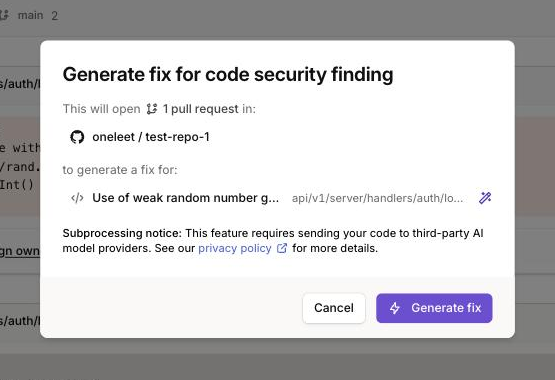
You can watch its progress from the same menu, and the resulting pull request includes a description of what was changed and why.
Requirements
Section titled “Requirements”Autofixes need write access to open pull requests, which is granted per integration connection:
- For GitHub, the Oneleet Code GitHub App with the Autofixes toggle enabled. The read-only variant of the integration can’t open pull requests. See the GitHub (Code) integration for the difference and how to switch.
- For GitLab, a group access token with the
apiscope. The connection is read-only if the token has onlyread_api, or if your self-managed GitLab instance is older than version 15.5, which can’t report a token’s scopes. See the GitLab integration for the token setup. - We don’t support autofixes for Azure DevOps or Bitbucket repositories yet. See Git provider support.
- The Autofix menu only appears on findings in repositories whose connection allows autofixes.
Privacy
Section titled “Privacy”Generating a fix requires sending the relevant code to third-party AI model providers, as noted in the confirmation dialog. See the Oneleet privacy policy for details on subprocessors.
Via API and MCP
Section titled “Via API and MCP”Autofix workflows can also be triggered programmatically, for example from an AI assistant connected to the Oneleet MCP server.